

Pricing custom web and mobile app development accurately remains one of the biggest challenges for startups and SMEs in 2026. Without a structured approach, you risk underestimating costs by 30% or more, leading to budget overruns and stalled projects. This guide walks you through proven pricing strategies, from understanding cost drivers to using specialized calculators that improve your estimates. You’ll learn how to define scope, select the right pricing model, and avoid common pitfalls that derail budgets. Whether you’re planning your first app or refining your approach, these actionable steps will help you control costs and set realistic expectations with your development team.
Table of Contents
-
Understanding the essentials: what affects custom development pricing
-
Preparing to price your project: defining scope and choosing a pricing model
-
Executing price estimation: using tools and expert techniques
-
Verifying and refining your pricing: common mistakes to avoid
Key takeaways
| Point | Details |
|---|---|
| Scope clarity drives accuracy | Detailed requirements and feature breakdowns prevent underestimation and scope creep. |
| Pricing models vary by risk | Fixed price suits defined projects while hourly rates work for evolving requirements. |
| Calculators accelerate estimates | Online tools factor in technology, team size, and timeline to generate quick baseline costs. |
| Verification prevents overruns | Including testing, deployment, and maintenance costs ensures complete budget planning. |
Understanding the essentials: what affects custom development pricing
With key aspects to consider summarized, let’s dive deeper into the essential factors shaping your project’s pricing. Project scope and functional complexity are primary drivers of custom development cost. The number of features, user roles, and integrations directly impacts how many hours your team needs to deliver a working product. A simple landing page costs far less than a multi-platform app with real-time data synchronization and third-party API connections.
Technology choices matter significantly. Building a native iOS app requires Swift expertise, while a cross-platform solution using React Native demands different skills. Backend complexity adds another layer. Projects needing custom databases, authentication systems, or AI features require specialized developers who command higher hourly rates. Your tech stack decisions ripple through every cost estimate.

Team composition affects both rate and duration. A senior full-stack developer charging $150 per hour might complete work faster than two junior developers at $75 each, but the calculation isn’t always straightforward. Geographic location plays a role too. North American developers typically charge $100 to $200 hourly, while Eastern European teams often deliver quality work at $50 to $100 per hour.
Client requirements introduce variability you must account for. Frequent revision requests, unclear specifications, or changing priorities extend timelines and inflate costs. Flexibility in your approach helps, but you need contingency budgets to absorb these variations without derailing the entire project.
Pro Tip: Always request detailed breakdowns showing hours per feature. This transparency helps you spot inflated estimates and understand where your budget goes, making it easier to prioritize features if cuts become necessary.
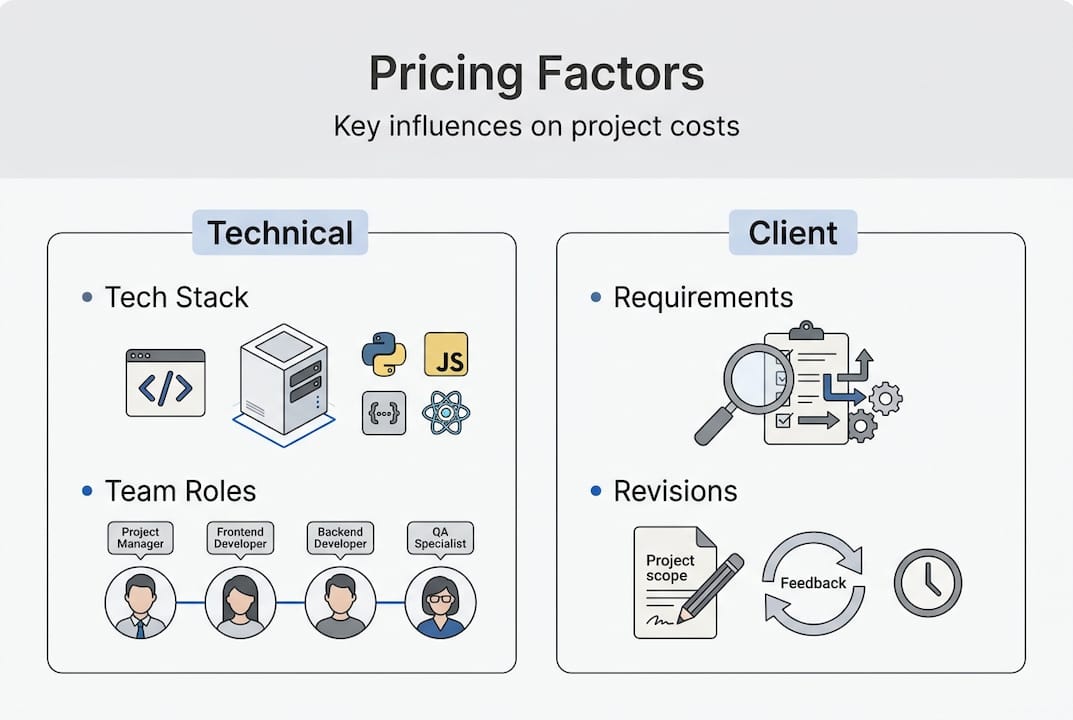
Understanding these factors helps you set realistic expectations from day one. You avoid the trap of comparing your complex e-commerce platform to a friend’s simple blog and wondering why costs differ so dramatically. Each project carries unique requirements that demand tailored pricing approaches. For deeper insights into cost drivers, explore estimating software development cost to see how professionals break down complex projects.
Preparing to price your project: defining scope and choosing a pricing model
Having understood pricing factors, you now learn how to structure your project scope and select a pricing method that suits your needs. Preparation separates successful projects from budget disasters. Start by collecting detailed requirements through stakeholder interviews, user research, and competitive analysis. Document every feature, no matter how small it seems initially.
-
Create a comprehensive feature list with user stories describing who needs what functionality and why. Include technical requirements like performance benchmarks, security standards, and compliance needs. This documentation becomes your pricing foundation.
-
Break down your scope into logical modules or development phases. A project management app might split into user authentication, task management, team collaboration, and reporting modules. This modular approach makes estimation more accurate and reveals dependencies between features.
-
Evaluate three common pricing models against your project characteristics. Fixed price works when scope is crystal clear and unlikely to change, giving you budget certainty but less flexibility. Hourly rates suit exploratory projects where requirements evolve, though they carry cost uncertainty. Milestone-based pricing combines both approaches, releasing payments as you hit defined deliverables.
-
Match your pricing model with project complexity and risk tolerance. Startups with tight budgets often prefer fixed pricing for predictability, while companies building innovative products choose hourly billing to accommodate discovery and iteration. Consider your team’s experience with similar projects when deciding.
-
Establish clear scope boundaries to prevent creep. Define what’s included in the initial build versus future phases. Create a change request process that documents how additional features affect timeline and cost. This clarity protects both you and your development partner.
Pro Tip: Build a prioritized feature matrix ranking items as must-have, should-have, or nice-to-have. This framework helps you make quick decisions when budget constraints force cuts, ensuring core functionality survives.
The table below compares pricing models to help you choose:
| Model | Best For | Risk Level | Flexibility |
|---|---|---|---|
| Fixed Price | Defined scope, tight budget | Low for client, high for developer | Limited |
| Hourly Rate | Evolving requirements, R&D | Shared between parties | High |
| Milestone-Based | Phased delivery, medium complexity | Balanced | Moderate |
Your preparation work directly impacts estimate accuracy. Vague requirements lead to vague pricing, which inevitably causes conflict when reality hits. Invest time upfront defining scope and selecting the right model. Use a development cost calculator to test different scenarios and see how scope changes affect your bottom line. This preparation transforms pricing from guesswork into strategic planning.
Executing price estimation: using tools and expert techniques
Now that you know how to prepare your scope and pricing model, let’s explore concrete tools and techniques to execute accurate price estimates. Online calculators help startups quickly estimate development costs by incorporating multiple factors. These tools ask for inputs like platform type, feature count, design complexity, and desired timeline, then generate baseline estimates using industry benchmarks.
Start by entering your project scope into a specialized calculator. Specify whether you’re building web, iOS, Android, or cross-platform solutions. Add your feature list, noting which require backend development, third-party integrations, or advanced functionality like payment processing or geolocation. The calculator processes these inputs against typical hourly rates and time requirements to produce a range.
Expert estimation techniques add nuance to calculator outputs. Bottom-up estimation involves breaking your project into the smallest possible tasks, estimating each individually, then summing the total. This granular approach catches details calculators might miss but requires significant time investment. Analogous estimation compares your project to similar past work, adjusting for differences in scope or complexity. This method works well when you have historical data.
Risk buffers separate realistic estimates from wishful thinking. Add 15% to 25% contingency for unexpected challenges, requirement changes, or technical obstacles. Projects using new technologies or inexperienced teams warrant higher buffers. This padding isn’t pessimism, it’s professional project management that accounts for reality.
-
Compare multiple estimation methods to triangulate accuracy. If your bottom-up estimate, calculator result, and analogous comparison all cluster around similar numbers, you’ve likely found a reliable range.
-
Validate estimates by consulting with developers who’ve built similar projects. Their real-world experience catches assumptions your calculations miss.
-
Adjust for current market conditions. Developer rates fluctuate with demand, and 2026 has seen increased costs for AI and machine learning expertise as these capabilities become standard expectations.
Pro Tip: Run three scenarios through your calculator: optimistic (everything goes perfectly), realistic (normal challenges occur), and pessimistic (significant obstacles arise). Present the realistic estimate but keep the pessimistic number in mind for internal planning.
The comparison table shows estimation method strengths:
| Method | Accuracy | Time Required | Best Use Case |
|---|---|---|---|
| Online Calculator | Moderate | Minutes | Quick baseline, initial budgeting |
| Bottom-Up | High | Hours to days | Detailed planning, fixed-price bids |
| Analogous | Moderate to high | Hours | Projects similar to past work |
| Expert Judgment | Variable | Minutes to hours | Validation, sanity checking |
Execution requires combining these approaches strategically. Use calculators for speed, then validate with expert techniques for precision. Document your assumptions so you can revisit them as requirements evolve. For platform-specific guidance, check out project cost calculation and app cost calculator resources that dive deeper into mobile and web estimation nuances. This multi-method approach transforms rough guesses into defendable estimates that stand up to stakeholder scrutiny.
Verifying and refining your pricing: common mistakes to avoid
After estimating your price, it’s crucial to verify your calculations and avoid common mistakes to ensure budgeting accuracy. Underestimating project complexity and not accounting for post-launch support inflate budgets later. Many startups focus exclusively on initial development while ignoring the ongoing costs that determine long-term success.
Under-scoping features creates the most frequent budget disasters. You estimate a user authentication system at 40 hours, but forgot about password reset flows, email verification, two-factor authentication, and admin user management. Each omitted feature adds hours that weren’t budgeted. Combat this by reviewing your feature list with experienced developers who’ve built similar systems and can spot gaps.
-
Include comprehensive testing costs covering unit tests, integration tests, user acceptance testing, and bug fixes. Quality assurance typically consumes 20% to 30% of development time but often gets shortchanged in initial estimates.
-
Budget for deployment activities including server setup, domain configuration, SSL certificates, app store submissions, and initial monitoring setup. These operational tasks add up quickly.
-
Account for maintenance and support covering bug fixes, security patches, OS updates, and minor feature enhancements. Plan for at least 15% to 20% of initial development cost annually.
-
Remember infrastructure costs like hosting, databases, content delivery networks, and third-party API subscriptions that recur monthly or annually.
Unclear requirements fuel scope creep that destroys budgets. When stakeholders can’t articulate exactly what they want, developers build something, stakeholders request changes, and the cycle repeats endlessly. Each iteration burns hours and budget. Prevent this by investing in detailed requirements documentation, wireframes, and prototypes before coding begins. Get sign-off on specifications so everyone agrees on deliverables.
Milestone-based payment structures help you monitor spending and progress simultaneously. Instead of one lump sum, tie payments to completed deliverables like